
https://www.accessbankplc.com/ https://www.accessbankplc.com/ https://www.accessbankplc.com/
  • ABOUT US
  • CONTACT US
  • Latest Naija News Today
  • Privacy Policy
  • TheGeniusMedia – Latest News, Naija News, and World News
Friday, August 21, 2026
The Genius Media NG
  • Login
  • News
  • Politics
  • Business
  • Crime
  • Education
  • Health
  • Jobs
  • Sports
No Result
View All Result
  • News
  • Politics
  • Business
  • Crime
  • Education
  • Health
  • Jobs
  • Sports
No Result
View All Result
The Genius Media NG
No Result
View All Result

ATTENTION!!! 4 Simple Steps On How To Link Your #NIN To Your Prepaid Meter, Resolve KTCs Issues

Tgmedia by Tgmedia
November 26, 2023
in News
0
How To Link Your #NIN To Your Prepaid Meter

ATTENTION!!! 4 Simple Steps On How To Link Your #NIN To Your Prepaid Meter, Resolve KTCs Issues

RelatedPosts

BREAKING: Singer Davido Rejects Tinubu’s Invitation To Aso Rock Over Elections

BREAKING: West Ham United Wan-Bissaka Signs For Aston Villa

BREAKING: Kwara Senator Saliu Mustapha Picks PDP Senatorial Ticket Hours After Resignation Of APC

ATTENTION!!! 4 Simple Steps On How To Link Your #NIN To Your Prepaid Meter, Resolve KTCs Issues—To enhance security, Lagosians under the Ikeja Electric network will have to upgrade their meters, with failure to do so resulting in customers’ inability to load energy tokens.

In a new campaign that started on November 1st, IKEDC (Ikeja Electricity Distribution Company) now sends KCTs (Key Change Tokens) for upgrading STS (Standard Transfer Specification) prepaid meters after they have been linked with the National Identification Number (NIN).

The Genius Media Nigeria understands that to get the two unique 20-digit tokens (KTCs) for upgrading your meter, you’ll need to link your NIN to your meter at smartkyc.ikejaelectric.com/nin.

Below are the steps to link your NIN to your prepaid meter:

Step 1: Click the “Link your NIN And Meter” button.

The first step in the process is to visit the Ikeja Electric official website. Look for the “Link your NIN And Meter” button and click. This will redirect you to a dedicated portal that handles the NIN linking process.

Step 2: Get Your Phone Number, NIN, and Email Address Ready.

Before kick-starting, ensure your phone number, NIN, and email address are readily available. Double-check the accuracy of your NIN to ensure the information you provide is correct.

Step 3: Confirm You Inputted the Correct NIN Details.

Once you’ve clicked the designated button, the portal will prompt you to enter your phone number, NIN, and email address. Take a moment to review the information you’ve entered and confirm the accuracy of your NIN details.

Proceed to the next step only when you are confident that the information provided is accurate.

Step 4: Input Your Meter Number and Verification Code

In the next and final phase of the process, you will be asked to input your meter number and a verification code. The verification code will be sent to the email address you provided earlier or your linked mobile number. Check your email or message inbox for the code and enter it into the designated field.

Take extra care when entering your meter number and verification code to avoid errors. Click the “submit” button to move on to the final step.

Conclusion

You have successfully linked your NIN to your prepaid meter with Ikeja Electric.

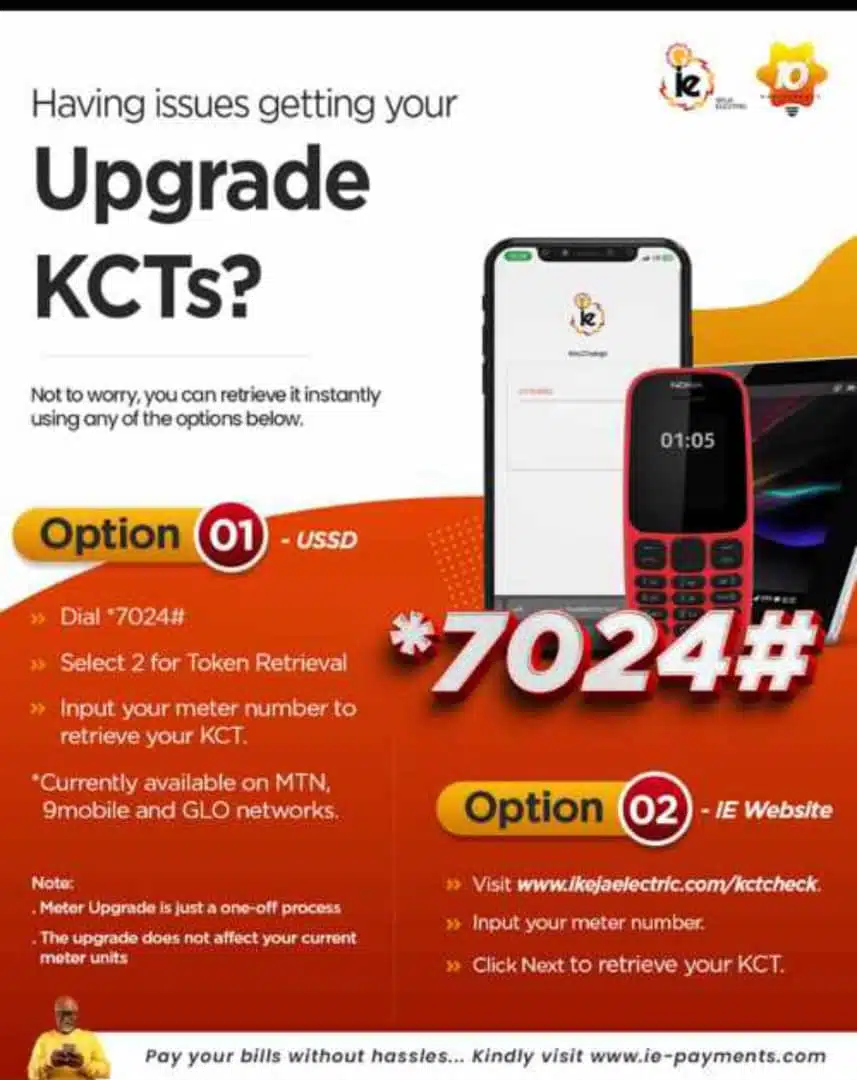
Purchase energy of any amount to get the two sets of 20-digit tokens necessary to load energy onto your prepaid meter.

You will be sent three different tokens to upload to your meter. Input KTC1, followed by KTC2, and finally, input your energy token.

Note: Only landlords can use a single NIN to register multiple meters. Tenants can only link NIN to one meter.

How to resolve KTC issues:
Share this:

  • Email a link to a friend (Opens in new window) Email
  • Tweet
  • Share on Telegram (Opens in new window) Telegram
  • Share on Reddit (Opens in new window) Reddit
  • Share on Tumblr
  • More

Like this:

Like Loading…

Related

Tags: 4 Simple Steps On How To Link Your #NIN To Your Prepaid MeterHow To Link Your #NIN To Your Prepaid MeterResolve KTCs Issues
Previous Post

#Haaland Hits New #EPL Record But Manchester City Lose No 1 Spot To #Arsenal

Next Post

BREAKING: Your Career Is Over!!!, Mauricio Pochettino Tells Denis Zakaria To Leave #Chelsea After #Newcastle Humiliation

Related Posts

FCCPC
News

MONEY LAUNDERING: Committee To Shut Down Businesses In Enforcement Drive – FCCPC

by Tgmedia
December 26, 2021
0

MONEY LAUNDERING: Committee To Shut Down Businesses In Enforcement Drive – FCCPC--The Genius Media Nigeria reports that the joint committee...

Read more
Alao-Akala

JUST IN: Alao-Akala’s Burial Begins February 14

February 1, 2022
Anthony Joshua Vs Otto Wallin

#JoshuaWallin: Watch Day Of Reckoning Live Stream Match Between Anthony Joshua Vs Otto Wallin Here

December 24, 2023
Next Post
Denis Zakaria

BREAKING: Your Career Is Over!!!, Mauricio Pochettino Tells Denis Zakaria To Leave #Chelsea After #Newcastle Humiliation

Please login to join discussion
ADVERTISEMENT

About Us

Thegenius Media.com.ng is an Online Nigerian NEWS HUB with good coverage and reportage of Exclusive Stories, Daily News Updates, Politics, Entertainment, Crime, Lifestyle, Relationship Tips and Sports.

RELEVANT PAGES

  • About Us
  • Privacy Policy
  • Contact Us

Alert Us

Important Press Releases, Breaking Stories, Special Investigations: thegeniusmedia1@gmail.com

Office Address

No 26 Oroleye Crescent off Abel Oreniyi Street.
Off Salvation Road, Opebi
Ikeja, Lagos

Tel:

Welcome Back!

Login to your account below

Forgotten Password?

Retrieve your password

Please enter your username or email address to reset your password.

Log In
No Result
View All Result
  • News
  • Politics
  • Business
  • Crime
  • Education
  • Health
  • Jobs
  • Sports

© TheGeniusMedia.com,ng

This website uses cookies. By continuing to use this website you are giving consent to cookies being used. Visit our Privacy and Cookie Policy.

Discover more from The Genius Media NG

Subscribe now to keep reading and get access to the full archive.

Continue reading

%d